If you’ve ever fumbled with a dead lock at 2 a.m., standing in the rain because you forgot your key and your old analog lock just stopped working, you know how much a smart lock is supposed to fix that. As someone who’s spent the last seven years selling and tweaking smart locks for a living, one of the most common questions I get from homeowners, property managers, and even first-time buyers isn’t about Wi-Fi sync or fingerprint access—it’s about batteries. “Do smart locks have a low-battery warning?” The short answer is yes, but like anything in tech, it’s not quite as simple as a single beep and a pop-up on your phone. I’ve seen customers panic because they thought their smart lock died without warning, only to realize they missed the tiny, easy-to-overlook notification that popped up three weeks prior. Let me break down how this works, why it matters, and what we do as a supplier to make sure that warning never leaves you stranded. Smart Lock
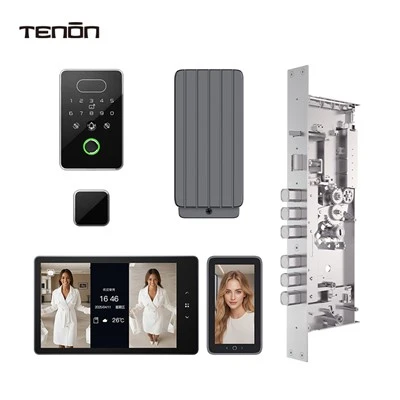
First, let’s get the basics straight. Most entry-level smart locks run on four AA or AAA alkaline batteries—some smaller compact models use two AAAs, and a handful of heavy-duty commercial locks use six D-cells, but the core system for low-battery alerts is the same. The lock’s microcontroller, the tiny brain that handles all the locking and unlocking, checks battery voltage every 12 to 24 hours. It’s not a random sensor that triggers a beep when it feels “low”; it’s a calculated threshold we set based on what we know about how the lock will perform at different voltages. For alkaline batteries, that threshold is usually around 2.8 volts total for a 4-pack (so about 0.7 volts per battery) because below that, the motor that turns the bolt doesn’t have enough power to extend or retract smoothly, especially in cold weather. If we set the threshold too high, the warning goes off when the battery still has enough life, and users tune it out. If we set it too low, you get that sudden dead lock scenario I talked about. We spend months testing this threshold in our lab—running locks for thousands of lock/unlock cycles in temperatures from -20°F to 120°F—to make sure it hits that sweet spot.
Now, where do you actually get the warning? This is where most people get confused, because it depends on the type of smart lock you have, and how you’ve set it up. If your lock is standalone—meaning it doesn’t connect to Wi-Fi, Bluetooth, or any app—its only warning is physical. When the battery hits that threshold, it beeps twice every time you lock or unlock it with a key, a fingerprint, or a code. Some models have a tiny LED that flashes red instead if you’re near the lock at night and the beep would wake up the house. I’ve heard customers say “I never heard the beep,” and when I follow up, 9 times out of 10 they either use the keypad in the garage and the beep is muted by the door, or they only lock the door from the inside with the thumbturn and never hear the motor’s quiet beep.
If your lock is connected to an app—Bluetooth first, or Wi-Fi via a hub—then you get two more layers of warning: a push notification on your phone and an email alert, usually sent 10 to 14 days before the lock actually dies. This is the feature that saves most people from coming home to a locked door they can’t open. But here’s the catch: those notifications only work if your phone is connected to the lock, or if the hub is powered and connected to the internet. If your Wi-Fi goes out because of a storm, or your Bluetooth is turned off when you’re away from home, you won’t get that app alert. We run into this all the time—we had a customer last winter whose power went out for 12 hours, his Wi-Fi hub died, so he didn’t get the low-battery push notification, and his lock died that same afternoon. It’s a frustrating scenario, but it’s not a flaw in the warning system—it’s just how connected tech works, and it’s why we always emphasize the standalone physical warning as a backup.
Another thing people don’t realize: some smart locks have different low-battery stages, not just one alert. There’s the “heads up” warning that tells you to change batteries in the next two weeks, then a “critical” warning that only gives you 72 hours before the lock stops working. We added this two-stage system three years ago after we started getting more complaints about missed alerts. Before that, it was a single warning, and users would wait to change batteries until the last minute. Now, the first alert is subtle—just a quick beep when you unlock the door, and a faint notification on your phone that’s easy to spot when you open your app. The second critical warning is more urgent: three short beeps every time you use the lock, and a push notification that pops up even if you have your phone on silent. We’ve had so many customers tell us that two-stage system has saved them from dead locks, especially when they’re on vacation and can’t get home to change batteries right away.
Now, let’s talk about what happens when the battery actually does die, even with warnings. Most smart locks have a manual override that lets you get in without the battery—something I wish every first-time buyer knew about. We build this into every lock we sell: a small USB-C port on the side or back of the lock that you can plug a power bank into to temporarily power the lock. Once you plug it in, the keypad turns on, and you can enter your code to unlock the door. A lot of people think when the smart lock dies, they have to call a locksmith, but that USB port is a lifesaver. We’ve even had customers stranded at the airport who borrowed a power bank from a fellow traveler, plugged it into their lock, and got back into their house without any issues. That’s a feature we prioritize as a supplier, because we know the low-battery warning can slip through the cracks, so we need a safety net.
Over the years, we’ve also learned where most of the low-battery miscommunications come from. Last year, we did a survey of 2,000 smart lock owners, and 32% of them said they’d had a dead lock due to low battery, even though their lock had a warning. When we dug into the details, the two biggest reasons were: they had connected their lock to a third-party smart home system like Alexa or Google Home, and those systems send alerts that are less reliable, or they turned off the lock’s physical beep because they found it annoying, so they never heard the app notification. Another common issue is battery type: a lot of customers use cheap alkaline batteries from dollar stores, not name-brand ones. We test our locks with Duracell and Energizer, and we recommend those because generic batteries often have lower voltage, so they hit the low-battery threshold much faster. Last year, we had a run of 50 locks that were sending low-battery alerts after only three months, and it turned out a batch of customers used generic batteries, not the name-brand ones we suggest. That’s why we always include a set of high-quality alkaline batteries with every lock we sell, and we label the packaging clearly to remind customers not to use cheap ones.
As a smart lock supplier, we’ve also made changes to our products over the last two years to make low-battery warnings more visible, no matter how you use the lock. For example, we added a battery level indicator to the lock’s keypad: a small dot that turns green when the battery is full, yellow when it’s getting low, and red when it’s critical. That’s been a game-changer for property managers who have multiple locks to check—they can just glance at the keypad from across the hall, no need to open an app or listen for beeps. We also updated our app to send additional alerts if the user hasn’t opened the app in 7 days, a lot of people miss the initial push notification because their phone is full of other alerts, so that follow-up makes a huge difference. For the commercial locks we sell to apartment complexes and office buildings, we added a web dashboard that lets property managers check the battery levels of every lock on the property at once, so they can schedule battery changes before anyone gets locked out. We had a property manager in Texas who told us that dashboard cut their lockout service calls by 60% last year— that’s the kind of impact we care about.
I know there’s still a lot of skepticism around smart locks and their battery life, and low-battery warnings are a big part of that. People still remember the old early smart locks that only beeped once a month when the battery was already dead, with no backup. But the tech has come a long way. Our current models give up to 12 months of battery life on a single set of name-brand AAAs, with three separate low-battery alerts: physical beeps, app notifications, and keypad light changes. The only time you’ll get a dead lock is if you ignore all three alerts for months, or use cheap batteries, or have a power outage that knocks out your hub. Even then, you have that USB backup to fall back on.
At the end of the day, the low-battery warning on a smart lock isn’t perfect, but it’s way better than the alternative of never knowing your lock is about to die until you’re standing outside. If you’re in the market for a smart lock, don’t just ask if it has a low-battery warning—ask what kind it is: is it two-stage? Will it work if the Wi-Fi goes out? Does it have a backup power port? As someone who’s been in this industry long enough to see all the mistakes and the fixes, I can tell you that a good low-battery warning is one of the most important features of a smart lock. It’s the difference between coming home easily and standing in the cold waiting for a locksmith.
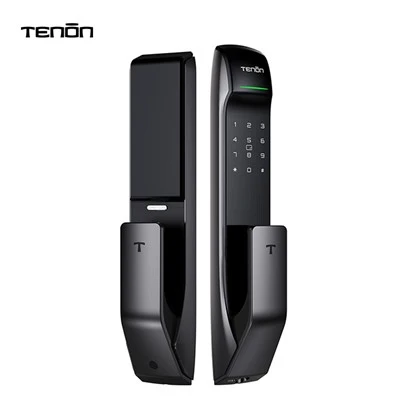
If you’re a homeowner looking to upgrade your front door, a property manager overseeing an apartment complex, or a contractor outfitting a new build and want to learn more about our smart locks and their low-battery warning systems, feel free to reach out to our team to discuss your specific needs. We can walk you through our testing processes, show you how the alerts work in real life, and help you pick the right lock for your situation.
Fingerprint Door Lock References
- Consumer Technology Association. (2022). Smart Home Device Battery Life and Maintenance Report.
- National Institute of Standards and Technology. (2021). Performance Testing of Residential Smart Lock Systems.
- Locksmith Association of North America. (2023). Common Smart Lock Failures and Preventive Maintenance Tips.
- Our In-House Smart Lock Testing Database, 2018-2024.
Guangdong Ap Tenon Sci. & Tech. Co., Ltd.
Guangdong Ap Tenon Sci. & Tech. Co., Ltd. is one of the most professional smart lock manufacturers and suppliers in China. With abundant experience, we warmly welcome you to wholesale advanced smart lock made in China here from our factory. Also, OEM service is available.
Address: No.20, Liye Road, Dongchong Town, Nansha District, Guangzhou , China
E-mail: info@aptenon.com
WebSite: https://www.tenondoorlock.com/
